17. Directory Import
Part 17
/admin/products/quantagrid/directory · Product scope. Pull directory
groups and their members into the app — so you create accounts once, in your
directory, rather than twice.
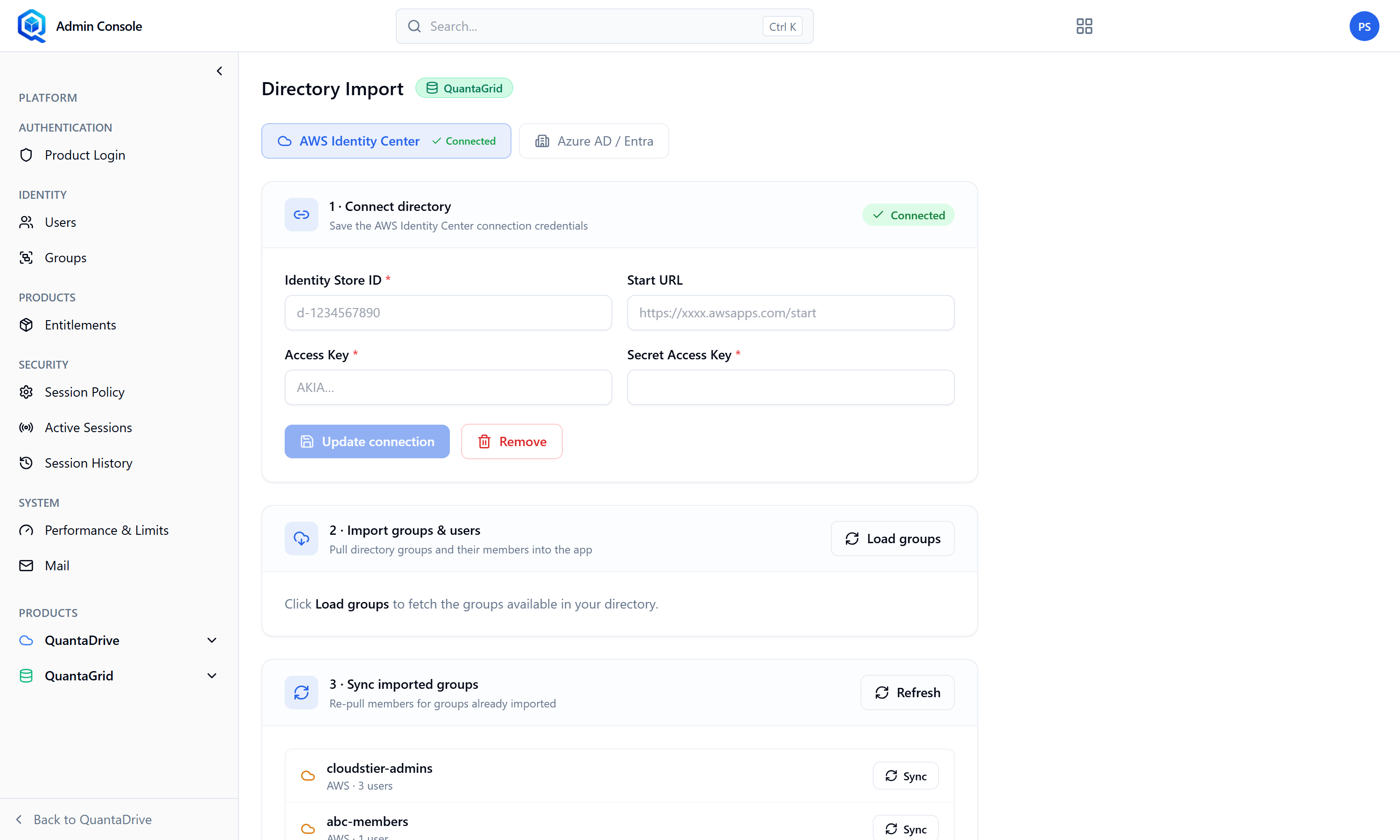
Directory Import. Imported accounts still need a product grant on Entitlements.
The page runs in two numbered steps: 1 · Connect directory and 2 · Import groups & users. The provider shown here is Azure AD / Entra.
Connect the directory
Supply the identity store details — for AWS, the directory id (d-1234567890), the start URL (https://xxxx.awsapps.com/start) and an access key (AKIA…).
Press Load groups
The available groups appear. If you see No groups found in the connected directory, the connection succeeded but the directory has nothing matching — check you connected the right one.
Select the groups to import
Their members come with them.
Import
Imported accounts then appear under User Management → Directory, where they are read-only.
Re-pull when the directory changes
The page offers Re-pull members for groups already imported. Run it after a joiner or leaver wave; membership does not update by itself. Before any import has run it reads No directory groups imported yet.
After importing
Imported users still need a product grant on the Entitlements page. Importing creates the account; it does not decide what the account may use.