16. Connectors
Part 16
/admin/connectors · QuantaDrive scope. Enables the third-party import
connectors. Until you enable Box here, every user sees Box is not available
yet — Your administrator needs to enable Box in Admin → Connectors.
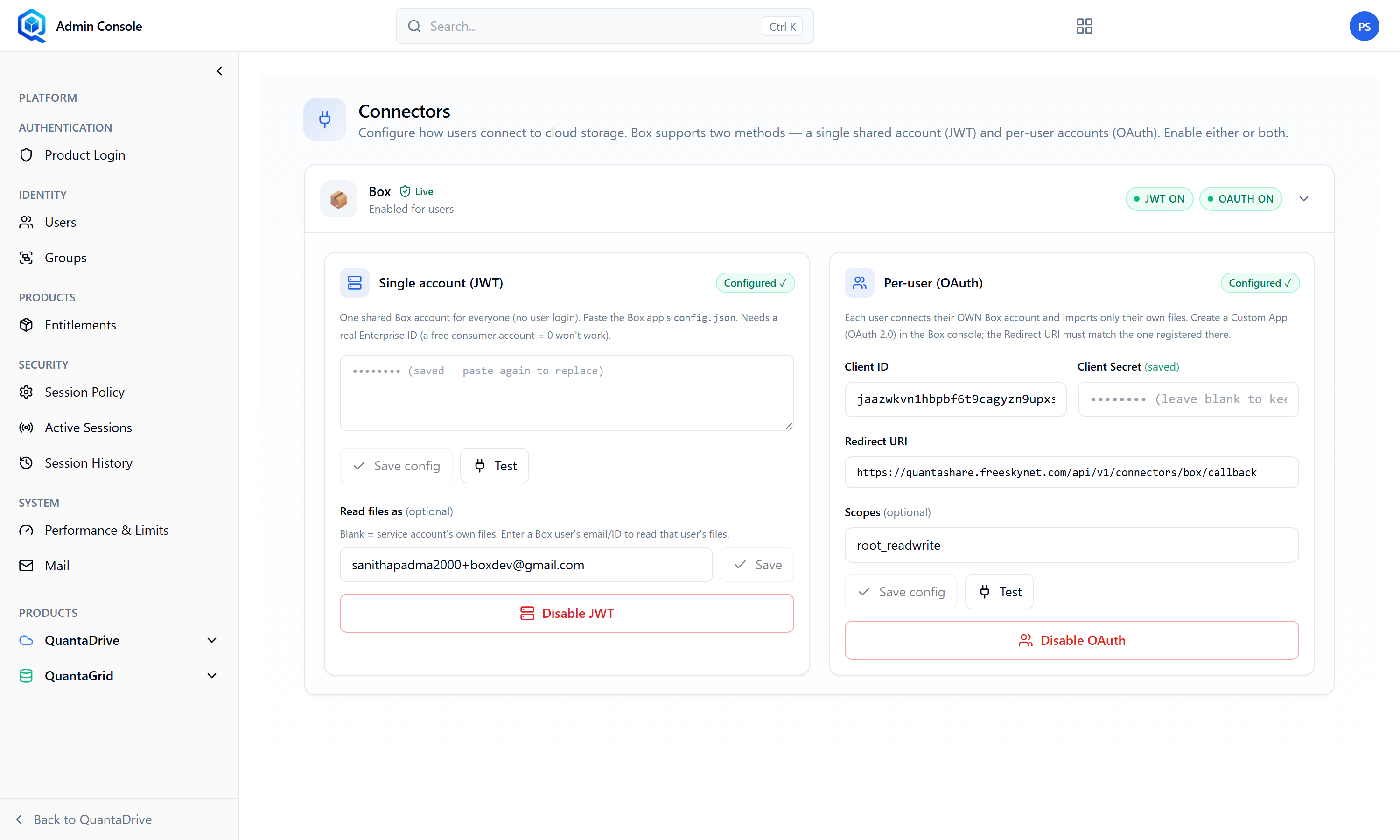
Admin Connectors. Until Box is enabled here, users see Box is not available yet.
16.1. Setting up Box
The page offers Save config and Test for the connection, and separate Disable JWT and Disable OAuth controls for the two ways Box can authenticate — the server-to-server JWT app, and the per-user OAuth sign-in that backs My Box account.
Create an app in the Box developer console
You need it to obtain the client credentials below.
Enter the Client ID
Labelled Box app Client ID.
Enter the client secret
From the same Box app.
Set the Redirect URI
e.g. https://your-api/v1/connectors/box/callback. This exact address must also be registered in the Box app, or the sign-in returns an error after the user has already authenticated.
Set the Scopes
e.g. root_readwrite. Grant the least that the import needs.
Choose how files are read
The Read files as setting determines whose permissions apply during import. Leave blank for service account uses the app’s own identity instead of an individual’s.
Save and enable
Then test with your own account before telling users it is available.