13. Connectors — importing from another cloud
Part 13
Connectors bring content from other cloud services into QuantaDrive. The page describes itself as Bring content from other clouds into QuantaDrive.
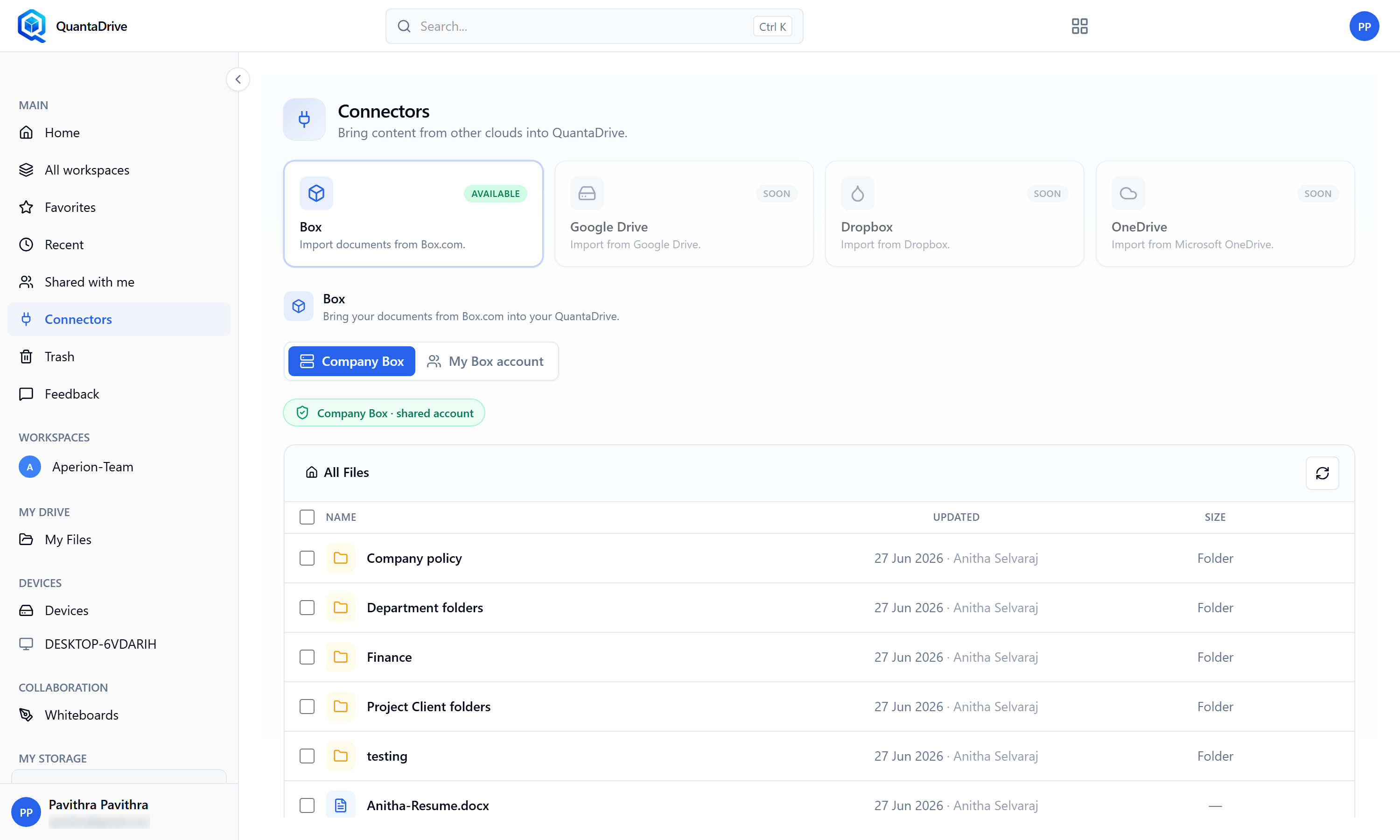
The Connectors page. Box is marked AVAILABLE; the others are marked SOON.
13.1. Which services are available
Four connectors are listed across the top:
- Box
Marked AVAILABLE — Import documents from Box.com.
- Google Drive, Dropbox, OneDrive
Marked SOON. These are not usable yet; the cards are there to show what is planned.
13.2. The two ways to reach Box
Under the cards, the Box panel offers a choice:
- Company Box
A shared Box account that your organisation has already connected. There is nothing to sign in to — the badge Company Box · shared account confirms you are using it, and the files below are the ones your organisation has shared. This is what most people will use.
- My Box account
Your own personal Box account. Choose this tab if you need files that live in your own Box rather than the company one; you will be asked to sign in to Box the first time.
13.3. Bringing files across
Open Connectors in the sidebar
Choose Company Box or My Box account
Company Box is already connected; My Box account will ask you to sign in.
Browse to what you need
The list shows NAME, UPDATED (with who changed it) and SIZE. Folders are marked Folder in the size column. Click a folder to open it, and use the breadcrumb above the list to come back up. The refresh button at the top right re-reads the folder.
Tick the items you want
Each row has a tick box; the one in the heading selects everything shown.
Import them, and choose where they should land
The chosen items are copied into QuantaDrive. Nothing is moved or deleted in Box — this is a copy.
If the Box panel is not there
Box has to be switched on for your organisation before it appears. If the Box card is marked something other than AVAILABLE, ask your administrator to enable it.