7. Entitlements
Part 07
/admin/entitlements · Platform scope. The most consequential page in the
console: it decides which products exist for your organisation and who may use
them. If it reads No products configured, nobody can sign in to anything.
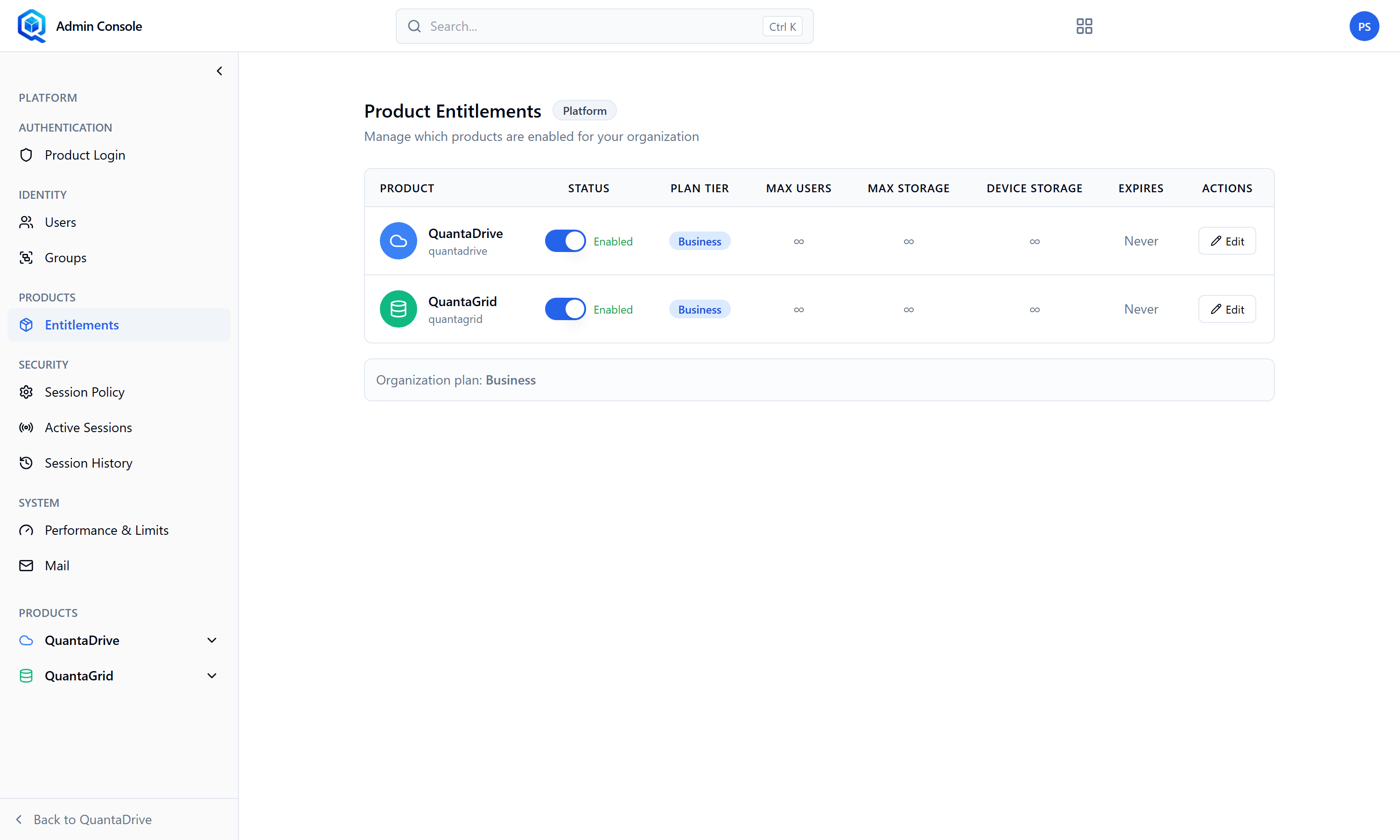
Entitlements. Both gates — the product switch and the per-user grant — live here.
7.1. The plan
The page is headed Product Entitlements. Each product is a row showing Product, Status, Plan Tier, Max Users, Max Storage, Device Storage and Expires, with Edit in the Actions column. The values below are what Edit opens.
- Plan Tier
Starter, Business or Enterprise.
- Max Users
How many accounts are allowed. Leave empty for unlimited.
- Max Storage (GB)
Total storage across the whole organisation. Empty means unlimited.
- Device Storage (GB)
The allowance for desktop-sync backups specifically. Empty means unlimited. Set this if you do not want laptop backups consuming the general quota.
7.2. Enabling a product for the organisation
Below the plan, each product can be enabled or disabled. Disabling a product hides it from every user immediately and removes its block from the admin sidebar.
7.3. Granting a product to one user
Grant or revoke per user in the same place. Remember both gates from 1.2: the organisation-level switch must be on and the user must be granted. Revoking is the gentlest way to suspend someone’s access without deleting their account.
The most common support ticket
“I can log in but there is nothing there” is almost always a missing per-user grant on this page. Check it before investigating anything else.